




© 2002-2007, John A. Reder, all rights reserved.
DOWNLOAD
 Download A.I. Sandbox v2.0.0 — FREE! (1.5MB)
Develop your own army A.I. in any computer language you wish and share it with others!
What Is It?
The A.I. Sandbox version of Fortress of Flags is designed to challenge people who love to write code. Many A.I. Wars players expressed a desire for a game where you can write your own AI in any language you choose — this is that game.
The unique quality is that it interfaces with an external Control Harness executable written by anyone who accepts the challenge. The harness can be written in any language or scripting tool you choose. Non-programmers can still enjoy the game by playing against AI developed by others.
Don't have a compiler? Microsoft gives away free Express Editions of VB, C#, J# and Web Developer — download one here.
How It Works
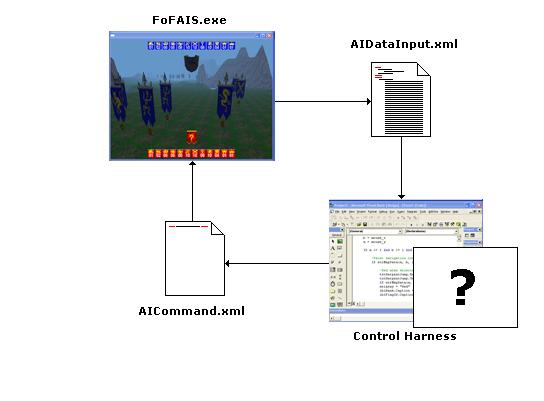
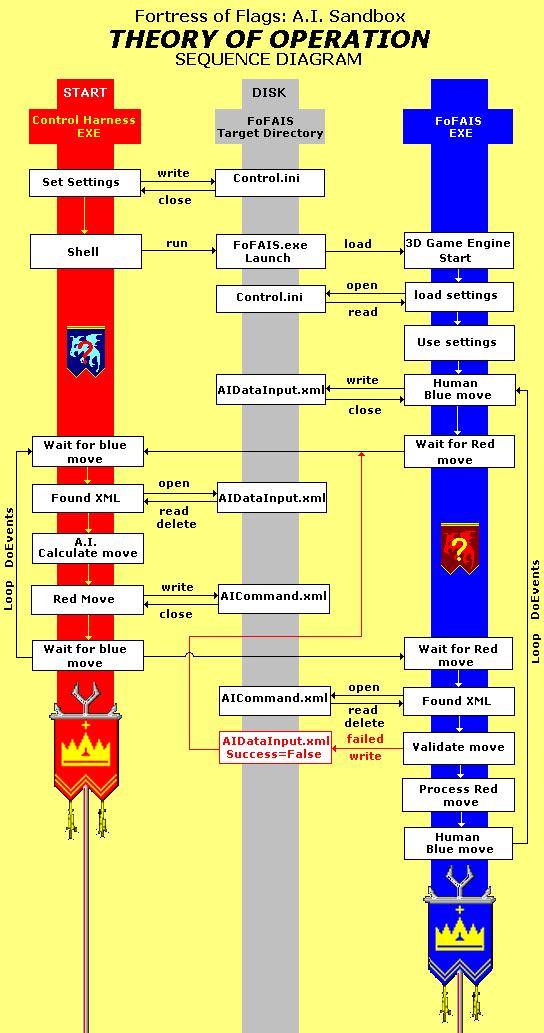
Your control harness needs to do three things:
- Create
config.iniin the FoF3DGE home directory and launchFoFAIS.exeto start the game. - Watch for
AIDataInput.xml— the game writes this file after every Blue army move. Import it to understand the battlefield state. - Write
AICommand.xml— issue your Red army's move, then return to step 2 and wait for the human player's next move.
Your goal: build a Control Harness that plays the Red Army opponent.
Starter Kit
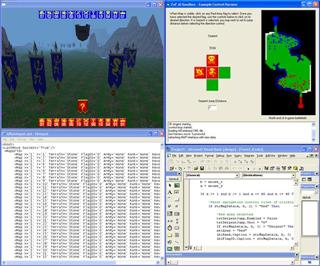
The download includes an example VB6 Control Harness (ExampleControlHarness.exe) with full source:
ControlHarness.vbpControlHarness.vbwControlHarness.frxControlHarness.frm
It is well-commented. This starter tool lets you simulate AI moves manually using a map viewer — it reads AIDataInput.xml, shows the battlefield visually, and writes the AICommand.xml file when you click a red flag to move it. It's a learning/testing tool, not a real AI — building the actual AI is up to you!
Technical Reference
Control.ini File Format
A three-line text file:
Narrow Pass.map
None
0
- Line 1: Map file name
- Line 2:
.SAVfile to resume from, orNoneto start fresh - Line 3:
1= full screen,0= windowed (640×480)
AIDataInput.xml Format
Generated by FoF3DGE after every Blue army move (or after a Red army command error):
<Root>
  <LastMove Success='True'/>
  <MapGrid>
    <Map X='1' Y='1' Terrain='Stone' FlagID='0' Army='None' Rank='None' Revealed='False'/>
    ...
    <Map X='80' Y='40' Terrain='Stone' FlagID='0' Army='None' Rank='None' Revealed='False'/>
  </MapGrid>
</Root>
The grid covers all 3,200 squares (80×40). X=1, Y=1 is the bottom-right of the Blue army end; X=80, Y=40 is the top-left. Terrain types: Grass, Rock, Water, Stone. Revealed='True' means the human player can see that flag's rank.
AICommand.xml Format
A single-line XML file your harness writes to issue a move:
<Root><Command FlagID='XXXX' Direction='X' SerpentJump='XX'/></Root>
- FlagID: 4-character key from
AIDataInput.xml - Direction:
N,S,E, orW - SerpentJump: 2-character number of spaces to jump (Serpent flags only; use
00for others)
Additional Notes
- By default, Blue army = human player; Red army = your Control Harness.
- Both the game engine and example harness write
.XMLfiles as.TMPfirst, then rename once complete — this prevents file-lock conflicts. - Flag artwork is separated from the engine, allowing custom game pieces.
- For multiplayer harnesses: use a saved
.savfile and flip the battlefield data (reverse R's and B's) for player 2. SeeFlipSave.BASin the Harness Library for a VB6 example.
Schools and teachers are welcome to use this as an educational tool! Competition is encouraged! Please share your results and code for other players to learn from.
Upload your harness (as a .zip) to the Harness Library.
Credits: Concept, 3D engine and example control harness programmed by John A. Reder — the rest is up to you!




© 1996-2025 John A. Reder